
Section 1: Hero

They Claim "6x Faster".
We Counted the 934 Filler Words They Left Behind.

We tested all three tools on the same 60-minute podcast. Press play to hear what "fast" sounds like.

πŸ”‡ Tap to hear the fillers

Every filler word you hear is one Recut left behind. This is their "finished" edit.

934
Filler Words
Recut Left Behind
47-78 min
Manual Cleanup
Time Required
3 min
TimeBolt Complete
Workflow (Zero Cleanup)
Quotes Section β€” Flip Cards
What the Competitors Claim

They wrote the articles. We ran the tests.

Tap to see what they said about TimeBolt.

Recut logo
Recut
Hover or tap to see their claim
"

Recut was 6x faster: it only took 1.2 seconds to read the audio and find the silence. TimeBolt took 7.4 seconds just to read the audio.

BlitzCut logo
BlitzCut
Hover or tap to see their claim
"

TimeBolt accuracy: 90–95%. BlitzCut accuracy: 93–97%. TimeBolt processing: 3–4 min. BlitzCut: 1–2 min.

Section 2: The Verdict

The Verdict: We Tested All Three

Remove the marketing. See the tools tested side-by-side on identical video. Same machine, default settings β€” measured from file open to production-ready output.

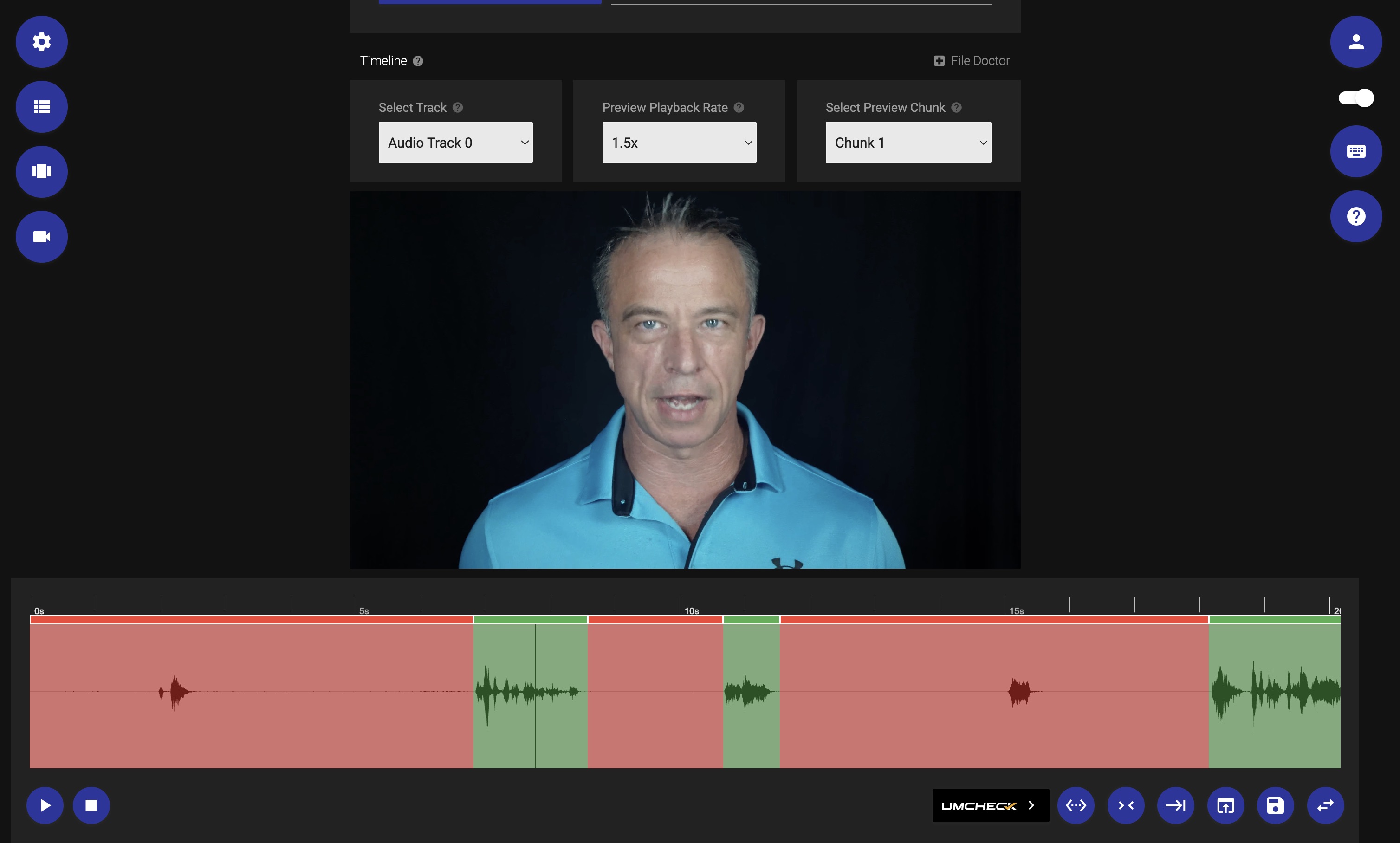
TimeBolt interface showing filler word detection on benchmark test
TimeBolt
πŸ‡ΊπŸ‡Έ Desktop Β· Mac / PC
0
Filler Words Left Behind
3 min
Time to Edit 60-Min Recording
42:55
Tightest Final Output
Recut
πŸ‡¨πŸ‡¦ Desktop Β· Mac Only
934
Filler Words Left Behind
47–78 min
Manual Editing to Finish
Processing: 4 sec
49:12
Longer Output Β· Fillers Intact
BlitzCut
πŸ“± Mobile Only Β· 15 min limit
Can't Do
Failed 3Γ— on 60-Min File
Can't Do
Mobile App Β· 15-Min Limit
β€”
No Output Produced
1

Zero Filler Words Left

TimeBolt's UmCheck uses AI to detect actual filler words β€” not silence thresholds. Nothing left to hand-fix.

!

Recut Has No AI at All

No transcript. No filler detection. Cuts silence only. Every "um" and "uh" stays β€” you fix 934 of them by hand.

βœ•

BlitzCut Fails at Scale

15-minute mobile limit. Their comparison article hides this by only testing short clips. Professional content? Not an option.

All tests on the same machine, default settings, identical source files. Β· TimeBolt Β· Recut Β· BlitzCut
Full Scoreboard β€” 8 Editors Tested
8 Editors Tested Β· Same Files Β· Paid Plans

Don't Worry β€” Slower Editors Are in Good Company.

We didn't stop at Recut and BlitzCut. We tested Descript, Gling, Premiere Pro, CapCut, and Loom on the same 60-minute podcast. Here's how everyone performed.

← Scroll to see all editors β†’
Metric TimeBolt Recut BlitzCut Descript Gling Premiere CapCut Loom
Filler Removal Accuracy 100% 0% Failed 83% 82% 74% 76% 35%
Bad Take Detection 91% Can't Do Can't Do 80% 85% Can't Do Can't Do Can't Do
Manual Fixes Required (per hr) 0 934 * Failed 693 654 787 718 Can't Fix
60-Min Long-Form βœ“ Silence only Failed 3Γ— βœ“ βœ“ βœ“ βœ“ βœ“
Platform Mac / Win Mac only iOS only Mac / Win Mac / Win Mac / Win Mac / Win Web
* Recut 934: Recut has zero filler word detection β€” every filler in the source file is a manual find-and-remove. That's more manual fixes than any AI editor on the board, because it isn't one.
Section 3: BlitzCut Exposed (Redesigned)

BlitzCut: The Platform That Can't

How a Mobile-Only App Compares Itself to Desktop Tools by Cherry-Picking 15-Minute Test Videos

BlitzCut's comparison article opens with a bold claim:

"In our tests, BlitzCut processes videos significantly faster than both TimeBolt and Recut."

β€” BlitzCut comparison article
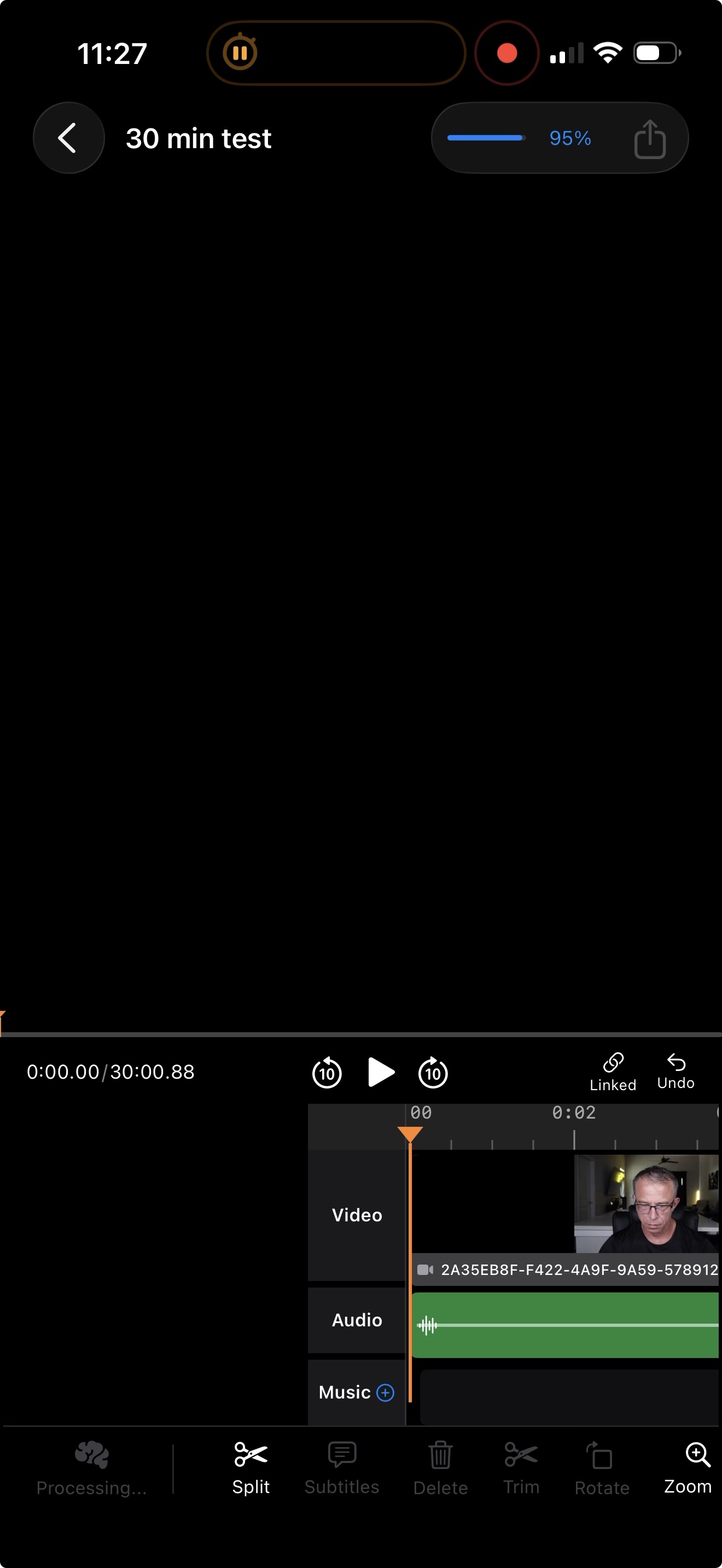
BlitzCut frozen at 95%

Here's what they don't tell you: their "test" used a 15-minute video. Convenient, since their tool completely bricks on anything longer than 30 minutes.

We tested BlitzCut on a 59-minute, 58-second podcastβ€”standard length for professional content. The result? Frozen at 95% processing. No error message. No recovery option. Just stuck.

We tried three times. Same video. Same iPhone 16 Pro Max. Same result: bricked at 95%, three times in a row.

This isn't a bug. It's a platform limitation. BlitzCut runs on mobile processors. Professional video editingβ€”1-hour podcasts, 90-minute interviews, webinar recordingsβ€”requires processing power that smartphones simply don't have.

The Cherry-Picked Test

Their comparison article tests a 15-minute video. Why 15 minutes? Because that's safely under their failure threshold. Professional content runs 30-90 minutes. Podcasts average 45 minutes. Video interviews run 60+ minutes. Webinars can be 2 hours. BlitzCut cannot process any of this.

But there's another problem. Even when BlitzCut does work on short videos, look at the settings required to match TimeBolt's output:
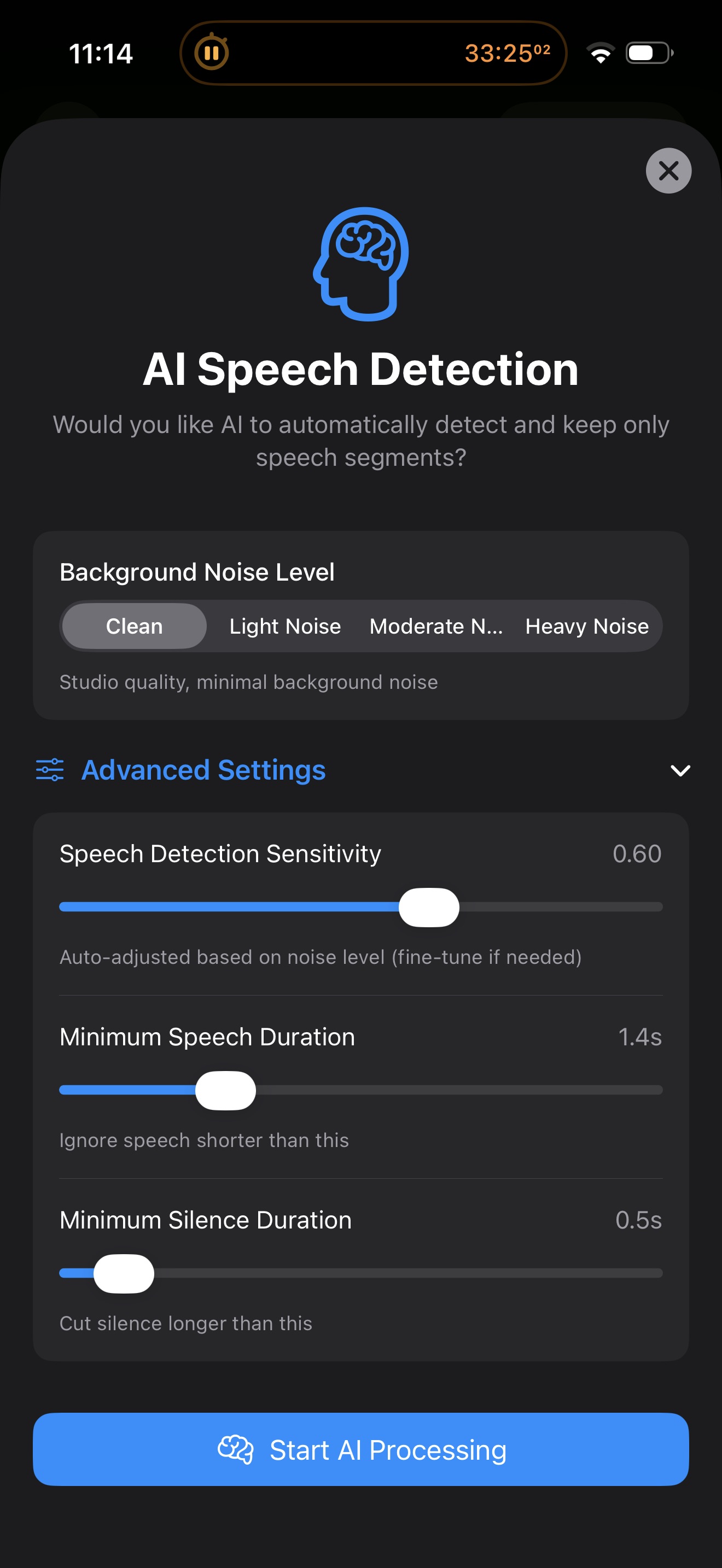
BlitzCut settings showing 1.4 second minimum

On their 90-second short-form test, BlitzCut matched TimeBolt's 15-second output. Impressiveβ€”until you see the settings. Minimum speech duration: 1.4 seconds.

This means BlitzCut cuts any phrase shorter than 1.4 seconds. It's not detecting filler words. It's just removing short pauses. In a real interview, this destroys your content:

"Yep" (0.4 seconds)β€”cut. "I know" (0.6 seconds)β€”cut. "Got it" (0.5 seconds)β€”cut. "Right" (0.3 seconds)β€”cut. "Makes sense" (0.8 seconds)β€”cut. "Exactly" (0.7 seconds)β€”cut.

These aren't filler words. They're responses, confirmations, natural conversation flow. BlitzCut removes them because they're short, not because they're fillers. This only "works" if every filler in your video happens to be perfectly isolated between full sentences. In real content, that never happens.

Meanwhile, TimeBolt's UmCheck uses AI to detect actual filler wordsβ€”"um," "uh," "like"β€”regardless of duration or position. No duration thresholds. No artificial hacks. Just AI-powered filler detection that works with production-ready settings.

Platform limitations make speed comparisons meaningless. BlitzCut is a mobile app for short-form social clips under 15 minutes. It cannot process professional-length content. Their comparison article deliberately tests 15-minute videos to hide this fundamental limitation. We tested 1-hour content. They failed three out of three times. Speed doesn't matter when you can't finish the job.
Section 4: Recut β€” Fast Processing, Unfinished Output

Recut: 6x Faster to an Unfinished Edit

Processing Speed Is Not Editing Speed. Here's What "6x Faster" Actually Costs You.

Recut's TimeBolt alternatives page leads with a speed claim:

"Recut was 6x faster: it only took 1.2 seconds to read the audio and find the silence. TimeBolt took 7.4 seconds just to read the audio."

β€” Recut, "5 Best TimeBolt Alternatives"
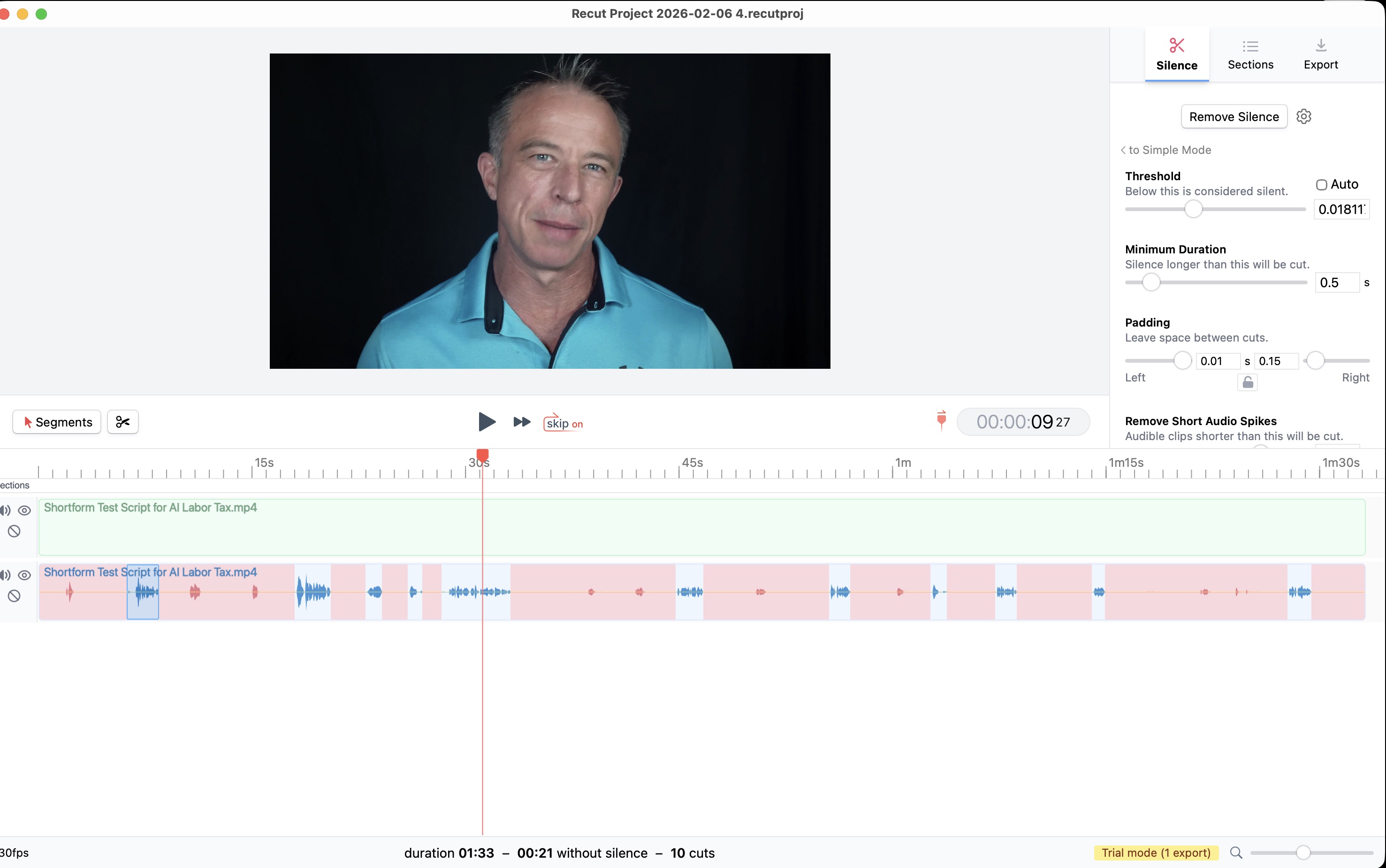
Recut interface on short-form benchmark test

That claim is technically true. Recut reads audio faster. But Recut only reads audio to find silence β€” that's all it does. It has no transcript engine, no AI, and no filler word detection. It cannot identify "um," "uh," "you know," "like," or any spoken filler word, because it doesn't understand speech at all.

TimeBolt takes longer to process because it's doing more. During that window, TimeBolt analyzes the waveform for silence, generates an AI transcript, and runs UmCheck to identify and flag every filler word in the recording. When TimeBolt finishes processing, the edit is done. When Recut finishes processing, your work is just starting.

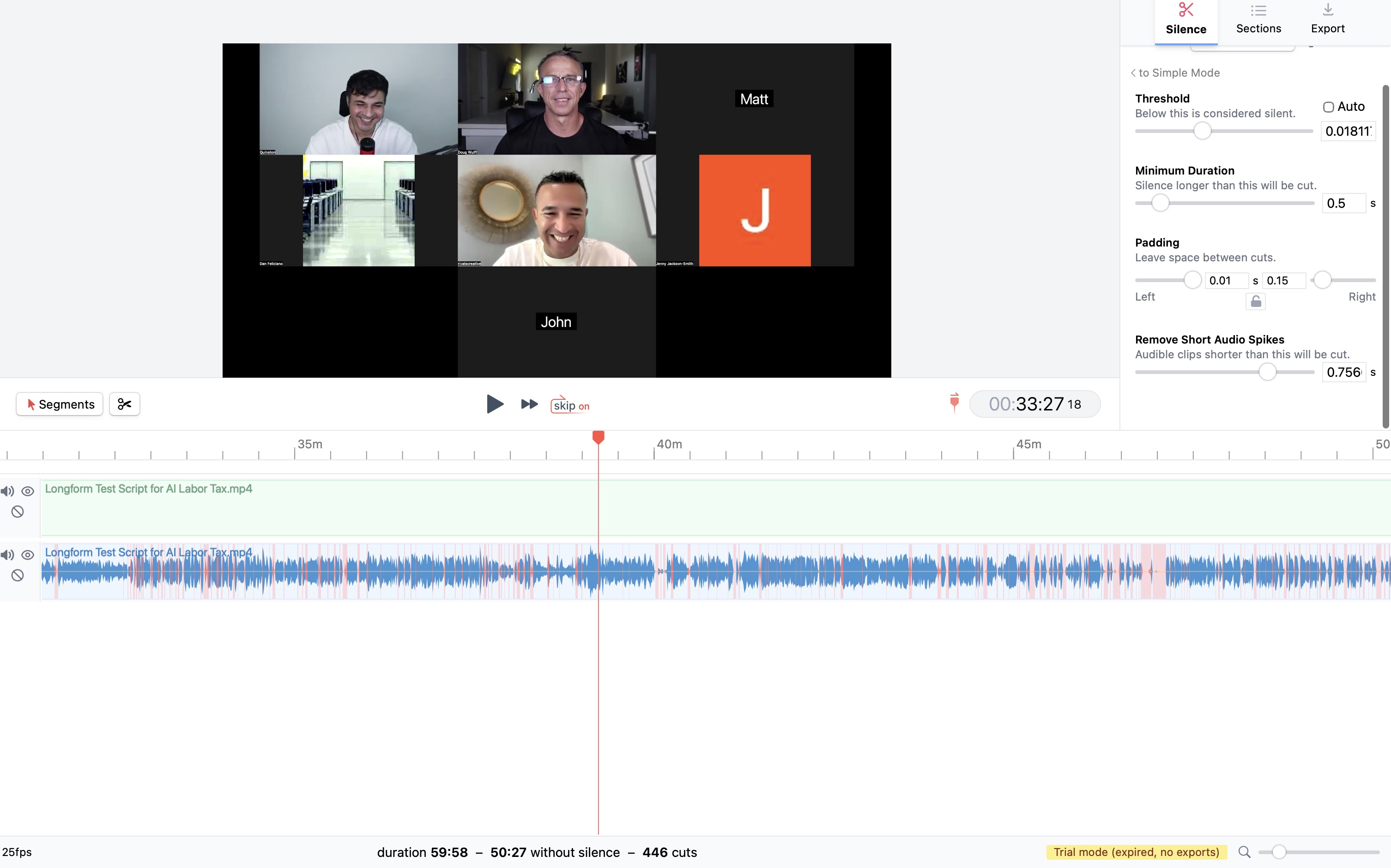
We ran Recut on the same 60-minute podcast we tested against BlitzCut. Recut processed in 4 seconds β€” then delivered an output with 934 filler words still in it.

Recut longform test β€” 49:12 output with all filler words intact

Recut's longform output: 49:12 β€” over six minutes longer than TimeBolt's 42:55, with every filler word still in place.

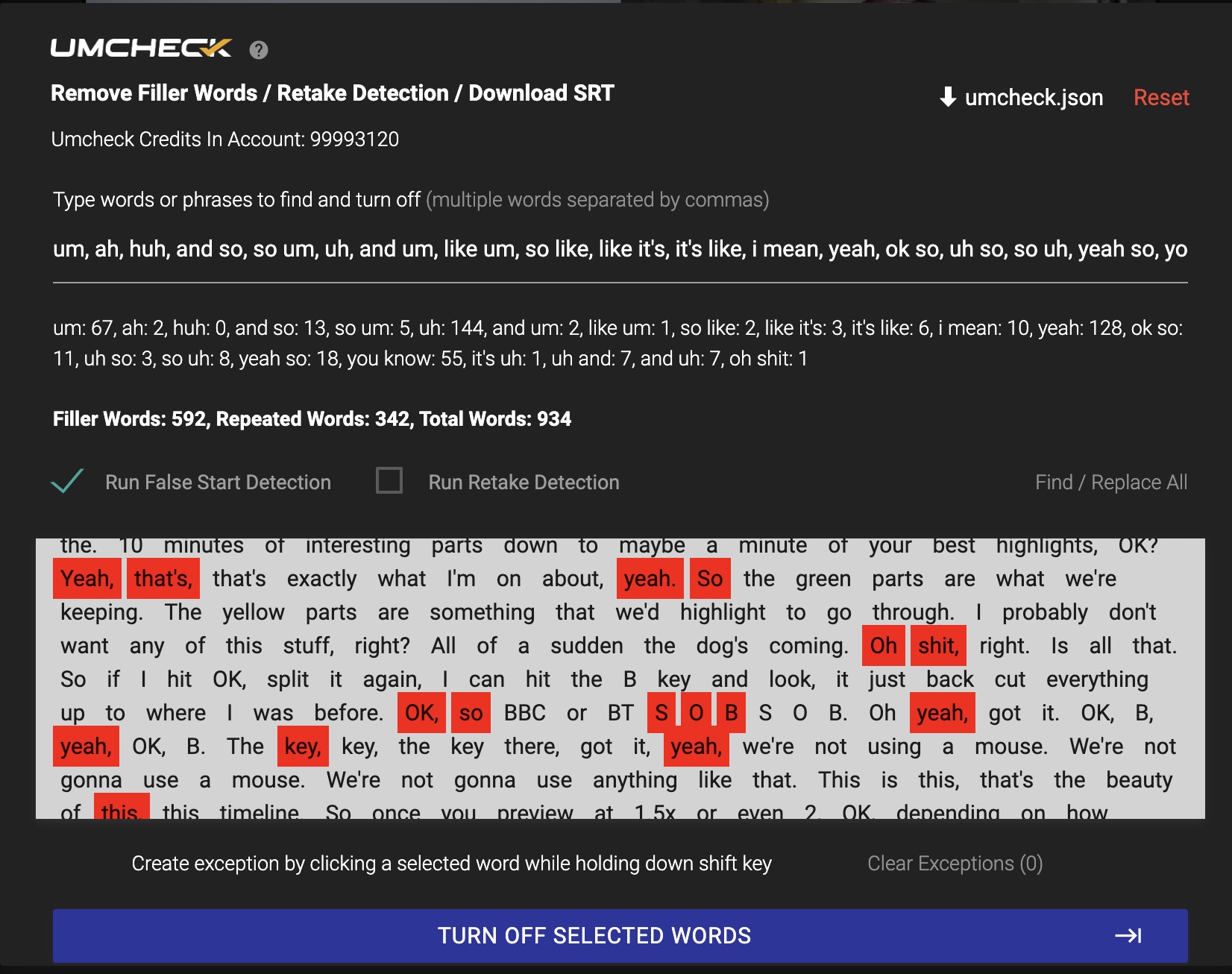
We then ran the Recut output through TimeBolt's UmCheck to count exactly what was left behind. The receipt:

934 filler words left in Recut output β€” identified by TimeBolt UmCheck

934 filler words. Every "um," every "uh," every "you know" and "like" β€” all still in the video. At 3 to 5 seconds per manual edit, that's 47 to 78 minutes of hand-editing to reach what TimeBolt delivered automatically in under 3 minutes.

Recut's "6x faster" processing saves roughly 3 minutes on a 60-minute recording. But it costs you up to 78 minutes of manual cleanup. The fastest way to remove dead air and filler words from video is the tool that finishes the job β€” not the tool that starts it quickest.

The question isn't which silence remover processes audio fastest. The question is: which video editor gives you a publish-ready edit with the least total time and effort? When you include filler word removal, bad take detection, and manual cleanup, TimeBolt delivers a finished edit in a fraction of the time β€” because it handles all of it automatically, in one pass.

Beyond Speed: 11 Features Recut Doesn't Have β–Ό
Feature TimeBolt Recut
AI Filler Word Detection βœ“ βœ•
Local AI Transcript βœ“ βœ•
Bad Take / False Start Detection βœ“ βœ•
Search & Find-All in Captions βœ“ βœ•
Scene-by-Scene Word Editing βœ“ βœ•
Silence Fast-Forward (Keep but Speed Up) βœ“ βœ•
Transitions Between Cuts βœ“ βœ•
Manual Cut Creation βœ“ βœ•
Built-in Screen Recorder βœ“ βœ•
Windows Support βœ“ Mac & PC βœ• Mac Only
Camtasia & iMovie Export βœ“ βœ•
Premiere / DaVinci / FCP Export βœ“ βœ“

Recut openly acknowledges many of these gaps on their own comparison page. It's a well-made silence removal tool β€” but silence removal is the first step in subtracting video, not the whole job.

Section 5: TimeBolt β€” The Complete Edit

TimeBolt: Process Once, Done.

Silence removal, filler word detection, and a finished edit β€” in one pass.

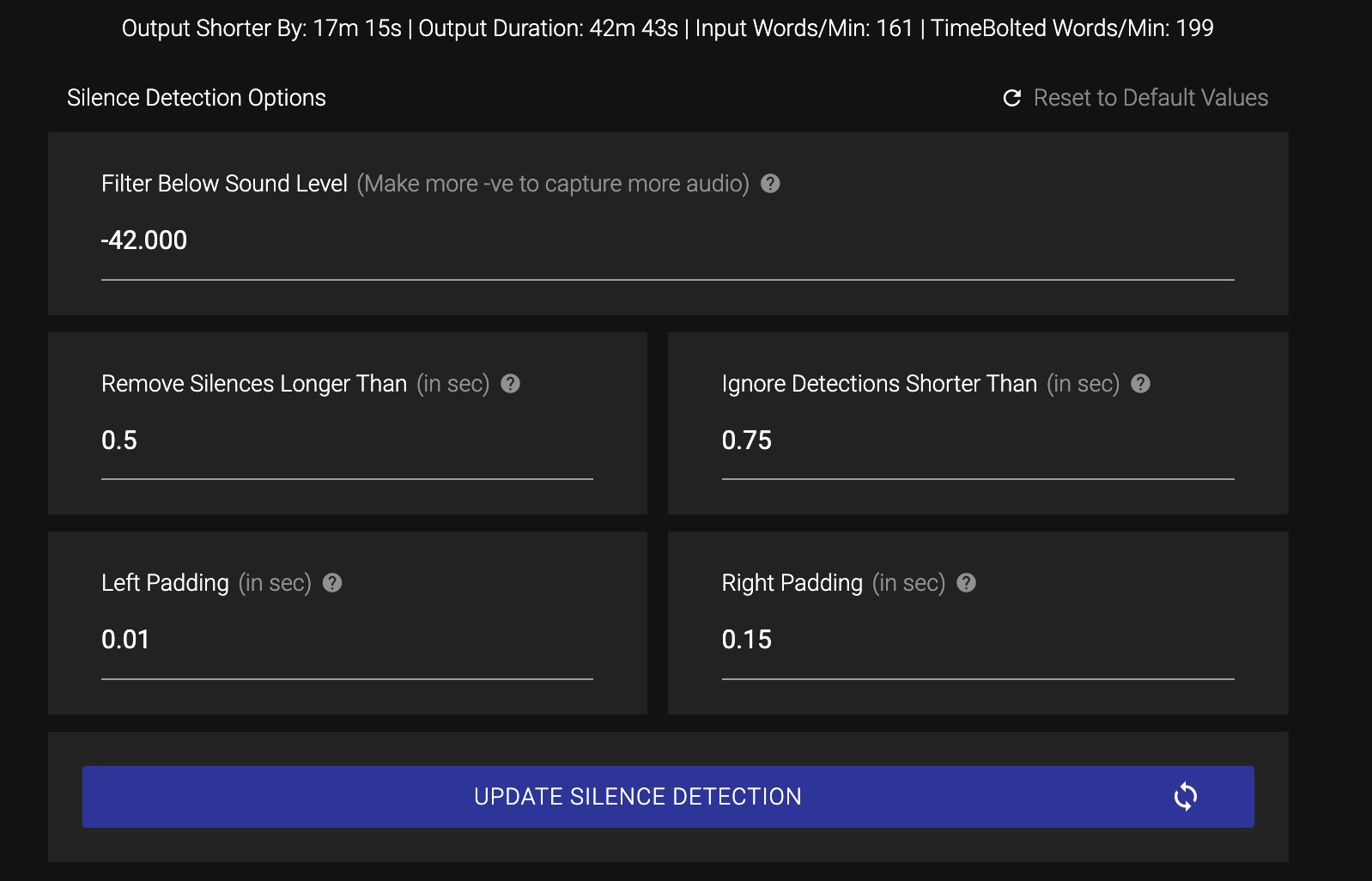
TimeBolt silence detection settings β€” production-ready defaults

TimeBolt's Waveform+ engine analyzes the audio waveform for silence, generates an AI transcript, and runs UmCheck to catch every filler word β€” all in one processing pass. No cloud upload. No manual review step. When the progress bar finishes, the edit is done.

On the same 60-minute podcast that bricked BlitzCut and left Recut with 934 unfixed fillers, TimeBolt delivered a clean, publish-ready edit in under 3 minutes. Zero filler words remaining. Tightest output of all three tools.

0
Fillers Left
948
Fillers Caught
42:55
Final Output
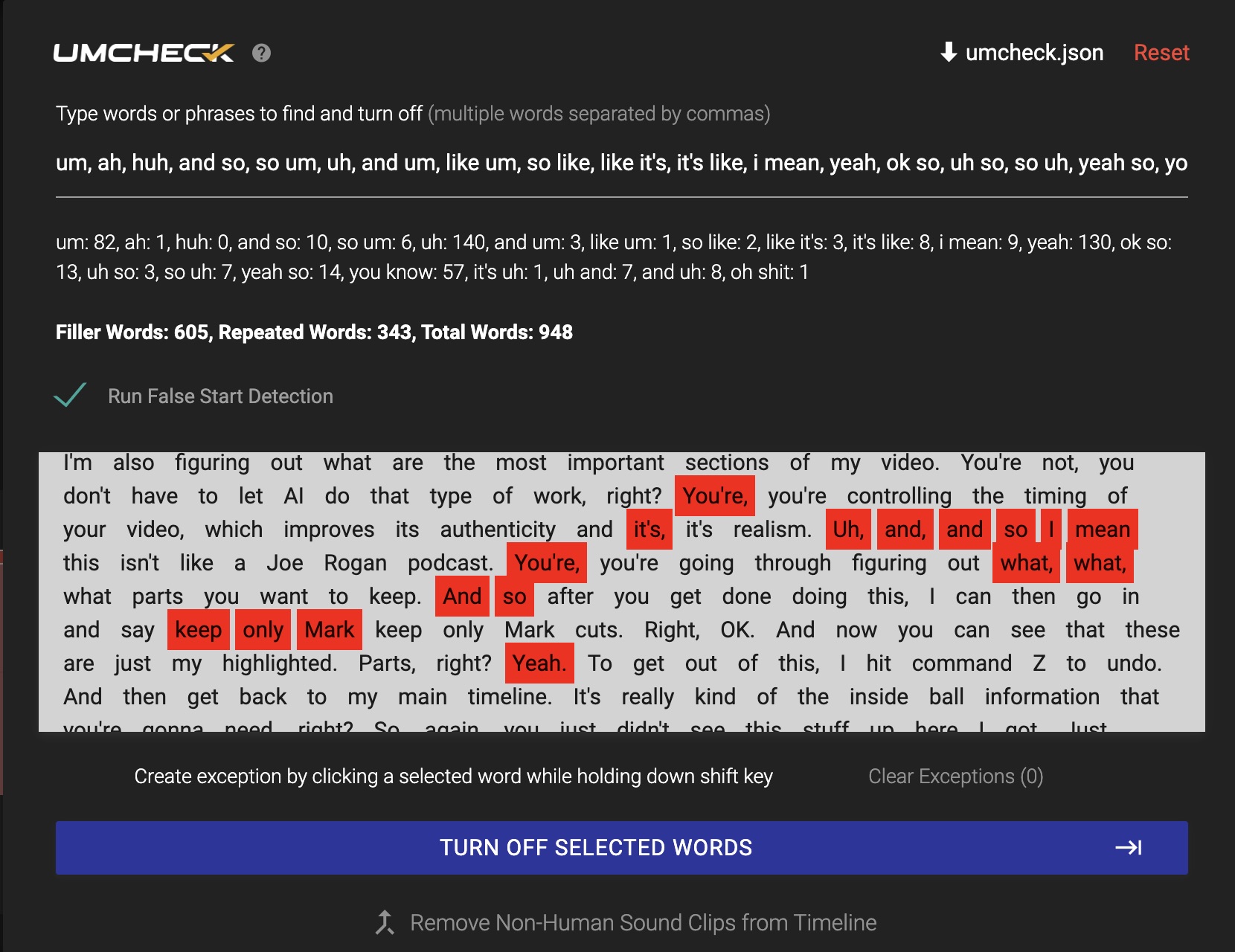
TimeBolt UmCheck results β€” 948 filler words detected and removed automatically

UmCheck results on 60-minute test: 948 filler words and repeated phrases detected and removed. Zero manual cleanup.

That's the difference between a silence remover and a video subtraction engine. Silence removal is the first step. Filler word detection, bad take removal, and caption-level editing are what turn raw footage into a finished product β€” and TimeBolt handles all of it before you touch the timeline.

Section 7: Test It Yourself

Don't Take Our Word for It. Run the Test Yourself.

We published the raw test files, settings, and full methodology. Download them, run the same benchmark on your own machine, and see what each tool actually delivers.

Read the Full Breakdown β†’

Includes test files, settings screenshots, and raw results

CTA β€” Try TimeBolt
TimeBolt

Stop Editing. Start Subtracting.

Try TimeBolt free. See how many filler words are hiding in your next recording.

Try TimeBolt Free β†’

Mac & Windows Β· No credit card required