
Trusted by 11,000 creators

The Video
Subtractor

Auto-remove silence, filler words, and bad takes with waveform precision and 4K Recording — then caption faster than you record it.

5.5× Faster
.01s Cut Control
90% Automated
Export to
Watch Demo
The Video Subtractor - TimeBolt Demo
GET TIMEBOLT
Edit-to-Record Speed

AI editors are fast until you have to check every cut.

In our benchmark, Gling and Descript left hundreds of mistakes per hour. TimeBolt stayed frame-tight because it cuts by waveform first, not AI guesswork.

TimeBolt
1:1
Edit = Record Time
AI Text Editors
1:3
3× longer to edit
Manual
1:5
5× longer to edit

Mistakes left per hour

Gling 677
Descript 500
TimeBolt 0

Why TimeBolt cuts cleaner.

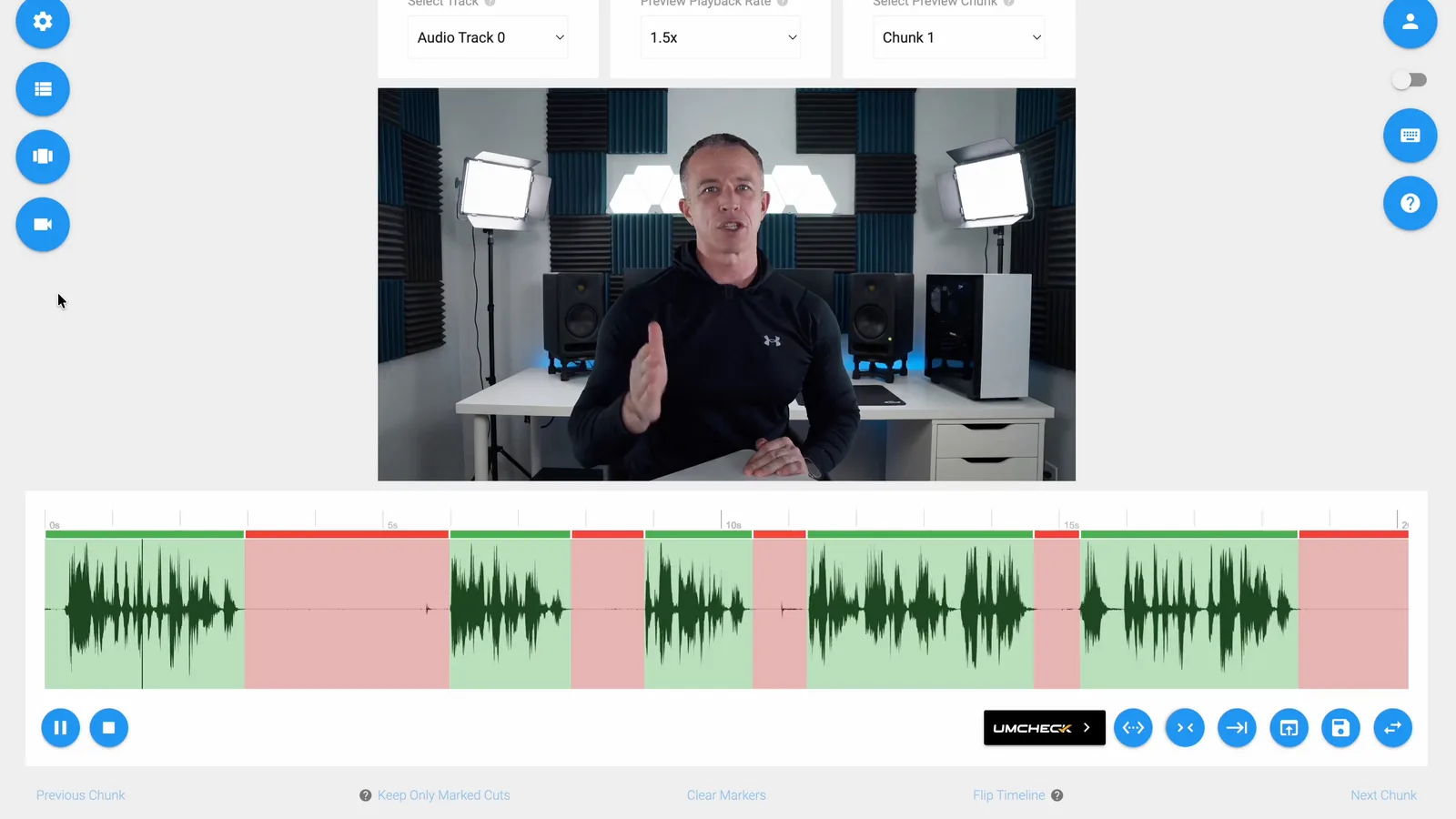
TimeBolt does not guess where edits belong. It reads the waveform, finds speech boundaries, and removes the junk before you polish.

13sPer Hour
0Cleanup
Waveform

WAVEFORM CUT

On-device waveform analysis detects silence with 0.01s precision—not AI transcriptions. Words never get cut off.

Silence Detection0.01s precision. Transcript tools are 20× less accurate. Padding ControlFine-tune breath room between cuts. Other tools can't. Local ProcessingYour footage never leaves your machine. No cloud upload.
0.01sTimeBolt
0.20sTranscript Tools
20×More Precise
AI

UMCHECK™ AI

Transcript-powered intelligence removes filler words, phrases, and bad takes. Auto-generate captions faster than you recorded.

Filler Words100% detection accuracy. Competitors miss 677 per hour. Bad TakesThe only software where you control how far you look ahead. 98% chance it doesn't cut good stuff. CaptionsBurn-in styled captions that sync perfectly after edits. Export SRT to add captions in design software. No drift. No re-syncing. PhrasesRemove any custom phrase. "Um", "you know", or your client's competitor name.
Multi-Cam

MULTI-CAM SYNC

Drop in every camera angle recorded to the same audio. TimeBolt aligns them by waveform—no timecode, no clap—then cuts the dead air across all tracks at once.

Waveform SyncTracks align by their shared audio signature. No timecode, no clap. All Tracks, One CutDead air is removed across every angle, perfectly in sync. Local ProcessingMulti-cam, multi-track, 2-hour files—your footage never leaves your machine.
Auto Switch

AUTO CAM SWITCHING

TimeBolt detects who's speaking and switches to the active camera for you. The rough cut arrives already switched—ready to finish in your NLE.

Speaker DetectionKnows who's talking and switches to them automatically. Switch Before ExportSee the camera switches in your timeline before you export. NLE HandoffExports the switched timeline to Premiere, Final Cut, or DaVinci Resolve.
11,700+
Paid Users
49,000+
Transactions
2019
Trusted Since

Mac + Windows · Local-first editing · No cloud upload

⚡ The TimeBolt Workflow

Boring to watchable.
Send a quick Banger.

Record in 4K, auto-remove silence, filler words, and bad takes, then share an unlisted link to get work done faster — before you ever open another editor.

1Capture

Your camera, mic, and screen — or import a file you already have.

2Cut

TimeBolt cuts by the waveform itself, so words never clip and nothing drifts.

3Banger

Burn-in captions, then send an unlisted link for feedback before you publish.

⚡ Only in TimeBolt
Exclusive
Turbo Mode

Talk 12% faster and still sound natural. Time compression that doesn't distort your voice.

Exclusive
Stitch

Make a preview teaser from your best moments.

Reviews

Loved by creators who hate editing dead air.

★★★★½ 4.54 from 140 reviews · 11,700+ paid users since 2019
2019
Where it started

Edit faster than you record.
Locally, from day one.

Silence removal, filler words, bad takes — all cut automatically on the machine. No upload. No cloud. Just speed.

YouTubers Marketers Podcasters Educators
See the workflow
TimeBolt Vault for Enterprise
2026
Where it's going

Async video for regulated enterprise. Solved.

Five years ago TimeBolt built video editing that never left the machine. At the time it was about speed. Today that decision is an architectural moat.