Remove Silence from Video. Automatically.
TimeBolt finds every pause on the audio waveform and jump cuts an hour of video in 13 seconds. Preview every cut, keep what you want, and export anywhere. Runs locally on Mac and Windows, nothing uploads.
GET TIMEBOLT
Trusted by 11,700+ creators, editors, and teams | See how it works ↓
How to Remove Silence from a Video
Open your video in TimeBolt, review the pauses marked on the audio waveform, and export the cuts you approve. Silence detection uses the audio level, so you can adjust the result without generating a transcript.
Keep the pacing intentional. Preview the beginning and end of spoken phrases and restore any pause you want to keep before exporting. See how to review and adjust cuts.
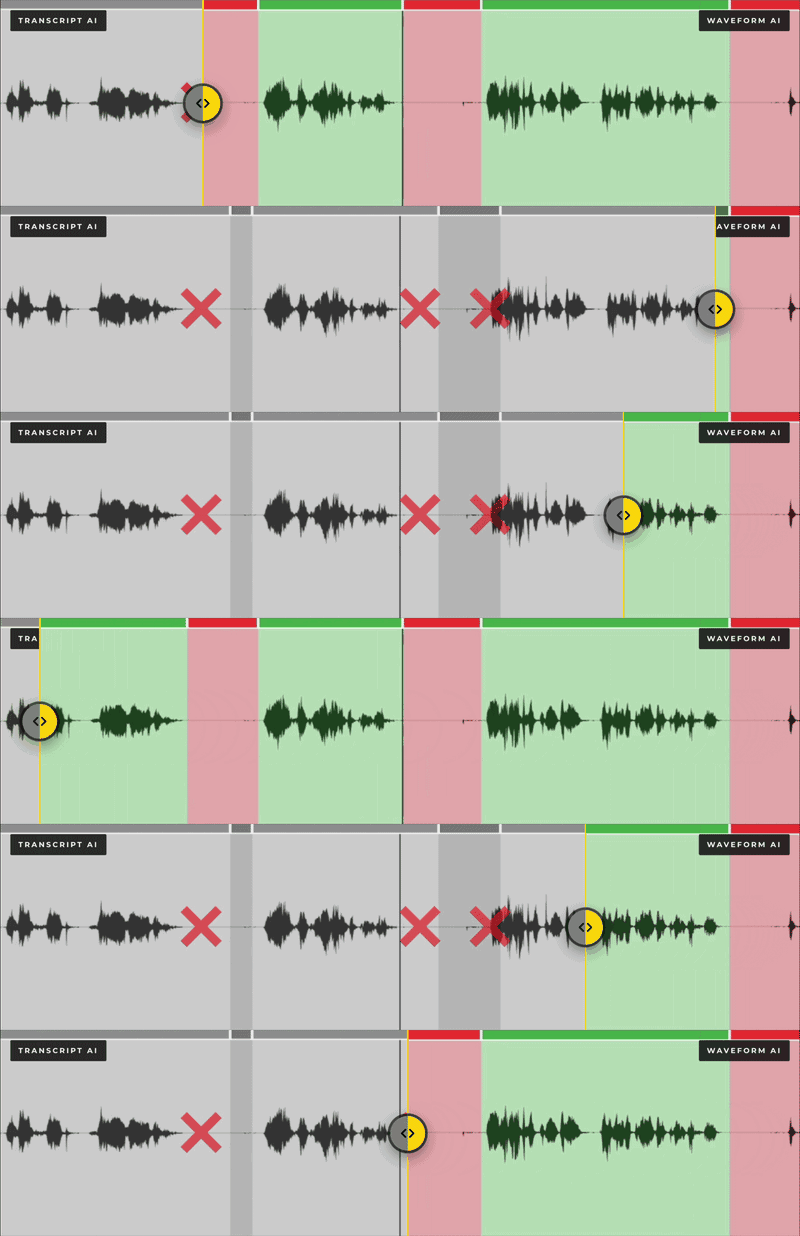
1. Detect on the Waveform
Drop in any video or audio file. TimeBolt scans the waveform and finds every silence at 0.01 second precision. An hour of footage takes 13 seconds.
2. Preview and Sculpt
Watch your video with the silences already skipped. Keep, cut, punch in, or fast forward any scene with a single key press.
3. Export Anywhere
Render a finished MP4, or send a fully cut timeline to Premiere Pro, DaVinci Resolve, Final Cut, or Camtasia.
The 3-Layer Cut: Why Words Never Get Clipped
Layer 1 reads the waveform and maps every silence. Layer 2 uses the transcript to find filler words and bad takes. Layer 3 snaps every cut back to the nearest waveform boundary at plus or minus 10 milliseconds, so no cut ever lands on a spoken word. Patent pending, and the reason transcript editors leave hundreds of clipped words per hour while TimeBolt leaves none.
5.5x Faster Than Transcript Editors
We ran TimeBolt against Descript, Gling, Loom, CapCut, and Premiere Pro on identical footage and published the raw data. TimeBolt finished 5.5x faster with zero minutes of manual cleanup. Every SRT and JSON file is downloadable.
SEE THE FULL BENCHMARKWorks With Your Editor
Detect silence in TimeBolt, finish in the timeline you already know.

Premiere Pro
The silence remover for Premiere Pro. Export XML or cut inside the extension.

DaVinci Resolve
Jump cut silence and send the finished timeline straight to Resolve.


Silence Is Just the Start
The same waveform engine cleans up everything else that makes long video unwatchable.
Remove Filler Words
UMCHECK finds um, uh, like, and 25+ filler words with millisecond precision. Your video never leaves your machine.
UMCHECKCut Dead Air from Audio
Podcasts and screencasts too. Delete dead air from audio and video with the same waveform precision.
Dead Air RemovalAuto Remove Bad Takes
Flag restarts and flubbed lines, then cut every one of them in a single pass.
Bad Takes
Speed It Up Instead
When the goal is show, not tell, FastForward plays silences at 0.5x to 4x instead of cutting them. Perfect for demos and screen shares. Exports in XML and FCPXML.
FastForwardCapture in 4K First
Free 4K screen and webcam recorder with no limits. Record locally, then cut the silence the second you stop recording.
4K Screen RecorderQuestions About Removing Silence
How does TimeBolt remove silence from video?
Can I remove silence in Premiere Pro, DaVinci Resolve, or Final Cut?
How long does it take?
Does it work for podcasts and audio files?

Zoom Recordings
An hour of meeting audio, cut to the 40 minutes that matter.
Open →
Podcast Editing
Multicam Riverside episodes, cut and camera-switched automatically.
Open →
YouTube Videos
Jump cut talking-head footage in minutes, not evenings.
Open →
CapCut to Shorts
Silence out in TimeBolt, Shorts-ready in CapCut.
Open →
Gaming and Twitch
Hours of raw gameplay, down to the upload-worthy moments.
Open →
Banger Messages
Record, cut, and share a link faster than you recorded it.
Open →Remove the Silence. Keep the Story.
Download TimeBolt and cut your first video in minutes. Mac and Windows.
DOWNLOAD TIMEBOLT